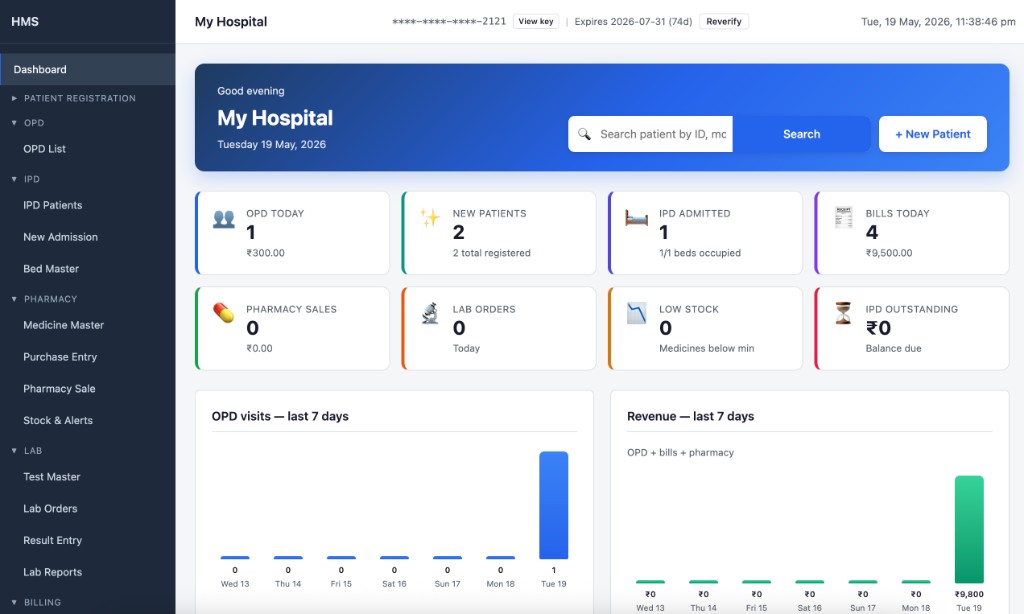
1 Dashboard
- Today's OPD visits, collections, new patients, pharmacy & lab totals
- Bed occupancy & IPD outstanding amount
- Low stock & expiry alerts, 7-day charts
- Global patient search & quick links
Register patients, run OPD and IPD, manage pharmacy and lab, and print bills — all from one desktop app. Your data stays on your computer.
3 days free, no card required · License from ₹1,180/month
Practical software for daily hospital work — without the cost and complexity of large enterprise systems.
Patient registration, appointments, OPD, e-prescriptions, IPD, billing, pharmacy, and lab in a single desktop app.
Data stays on your computer. No cloud dependency for daily hospital work.
Designed for busy front desks — register, bill, and print in a few clicks.
Dashboard, quick search, printable slips, prescriptions & bills in seconds.
Calendar views for month, week, and day — schedule and manage patient appointments by doctor in one place.
Add medicines and lab tests to a digital prescription during consultation, then print with your hospital letterhead.
Licensed software with optional app lock, local backup, and automatic Google Drive backup to protect data if your PC or hard drive fails.
3-day trial download — then monthly or annual license when you are ready.
HMS fits day-to-day operations at clinics, nursing homes, and small hospitals.
OPD and inpatient care with billing in one place.
Bed management, deposits, and running bills.
Register patients, consult, bill, and print prescriptions quickly.
Continue daily work when the internet is unavailable.
Daily collection summary plus local and Google Drive backup when you need it.
From registration to discharge — manage patients, billing, pharmacy, and lab without switching tools.
Real screens from the desktop app — dashboard, patients, e-prescriptions, billing, and reports.
Patient records are stored on your computer — built for Indian hospitals with familiar billing workflows.
Full HMS for 3 days on your PC — no account, no license key.
admin
Password admin
Happy with HMS? See license pricing below.
After your trial, register once, pay online, and paste your license key into the desktop app.
Pay monthly when your license expires. Instant key in the portal after payment.
Get license keyNew here? Register free · Already have an account? Log in
No. After you activate your license, everyday work — patients, OPD, billing, pharmacy, and lab — runs on your computer without needing the internet.
No. HMS is desktop software you install on Windows or Mac. Your records stay on your machine, not on a shared cloud server.
Save a local copy to a USB drive or external folder anytime. You can also turn on automatic Google Drive backup so HMS uploads scheduled backups to your Google account — if your computer crashes or the hard drive fails, restore from the cloud and get back to work.
You get 3 full days after installation. Use the download section above with login admin / admin — no payment or license key needed during the trial.
Create a free portal account, sign in, and choose Monthly (₹1,180/month) or Annual (₹11,328/year (20% off)). After payment you receive your license key immediately — copy it into the HMS app under license activation.
The trial runs for 3 days without a key. A paid license unlocks continued use: monthly renews every month, annual covers 12 months. Day-to-day hospital work still runs offline on your computer either way.