Windows & Mac · Works offline · Version 1.0

Hospital management software built for small facilities

Register patients, run OPD and IPD, manage pharmacy and lab, and print bills — all from one desktop app. Your data stays on your computer.
All-in-oneOPD, IPD, billing & more
30+ reportsPrint, CSV & PDF
Offline-readyWork without internet
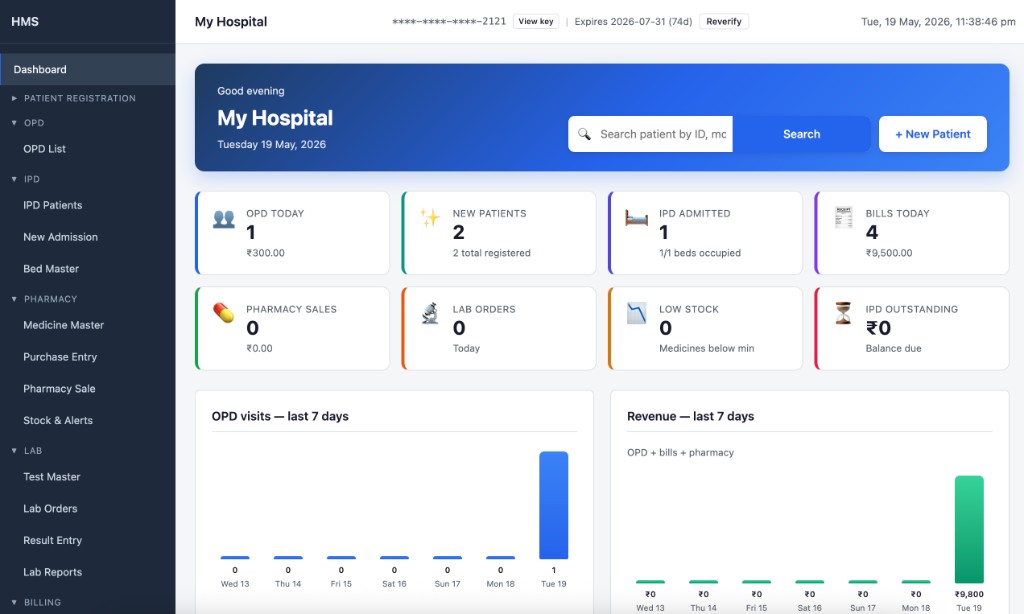
Bitbull HMS dashboard — OPD, IPD, pharmacy, lab, billing and daily hospital stats
HMS dashboard — your daily hospital overview

Why clinics and nursing homes choose HMS

Practical software for daily hospital work — without the cost and complexity of large enterprise systems.

🏥

All-in-one

Patient registration, OPD, IPD, billing, pharmacy, and lab in a single desktop app.

🔒

Offline & private

Data stays on your computer. No cloud dependency for daily hospital work.

👤

Easy to use

Designed for busy front desks — register, bill, and print in a few clicks.

Fast daily workflow

Dashboard, quick search, printable slips, prescriptions & bills in seconds.

🛡️

Secure & reliable

Licensed software with optional app lock and backup to USB or external drive.

💰

One-time desktop license

Install on your computer — no recurring cloud subscription for day-to-day use.

Built for your facility

HMS fits day-to-day operations at clinics, nursing homes, and small hospitals.

Small hospitals & clinics

OPD and inpatient care with billing in one place.

Nursing homes & day-care clinics

Bed management, deposits, and running bills.

Busy OPD counters

Register patients, consult, bill, and print prescriptions quickly.

Low-connectivity areas

Continue daily work when the internet is unavailable.

Owner-operated facilities

Daily collection summary and backup to USB when you need it.

Everything in one application

From registration to discharge — manage patients, billing, pharmacy, and lab without switching tools.

1 Dashboard

  • Today's OPD visits, collections, new patients, pharmacy & lab totals
  • Bed occupancy & IPD outstanding amount
  • Low stock & expiry alerts, 7-day charts
  • Global patient search & quick links

2 Master setup

  • Hospital profile, logo, GST, invoice & prescription settings
  • Department & doctor master with fees
  • Custom patient ID & bill number prefixes

3 Patient registration

  • Auto patient ID, photo, registration slip print
  • Search by name, ID, or mobile
  • Unified history: OPD, IPD, bills, pharmacy, lab

4 OPD

  • New & follow-up visits with auto token number
  • Prescription print with letterhead margins
  • Consultation & combined billing (OPD + lab + pharmacy)

5 IPD

  • Admission, bed master, service charges, deposits
  • Running bill, discharge & final bill
  • Auto bed vacant on discharge

6 Billing

  • All bills list — OPD, IPD, lab, pharmacy, combined
  • Cash, UPI, card, bank transfer, credit modes
  • Cash closing & day-wise collection summary

7 Pharmacy

  • Medicine master and bulk import
  • Purchase entry with batch & expiry
  • OPD, IPD & walk-in sales with stock alerts

8 Laboratory

  • Test master with multi-parameter tests
  • Orders, result entry, formatted lab reports
  • IPD charges post to admission bill

9 Reports (30+)

  • Financial, patient, pharmacy & IPD reports
  • Date filters, print, CSV & PDF download
  • Pending dues, bed occupancy, expiry stock

10 Settings & backup

  • Secure login for your facility
  • Optional app lock when stepping away
  • Backup and restore to USB or external drive

Your data stays with you

Patient records are stored on your computer — built for Indian hospitals with familiar billing workflows.

Works offlineDaily hospital work without internet
Local storageData remains on your PC
Windows & MacDesktop app for both platforms
Indian formats₹ currency and local date display
Quick searchFind patients and medicines fast
Print-readyBills, prescriptions & lab reports
Backup optionSave copies to USB or external drive
Licensed softwareGenuine copy for your facility

Get started in three steps

Download, install, and activate — then start registering patients the same day.

1

Download

Choose the installer for Windows or Mac and install on your front-desk computer.

2

Activate

Enter your license key after installation to unlock the full application.

3

Set up & go

Add your hospital profile, departments, and doctors — then start daily OPD and billing.

Frequently asked questions

Does HMS need internet every day?

No. After you activate your license, everyday work — patients, OPD, billing, pharmacy, and lab — runs on your computer without needing the internet.

Is HMS a cloud or browser app?

No. HMS is desktop software you install on Windows or Mac. Your records stay on your machine, not on a shared cloud server.

How do I back up my data?

Use the built-in backup option to save a copy to a USB drive or external folder. You can restore from a backup when needed.

How do I get a license?

Contact Bitbull Tech to purchase a license key, then enter it in the app after installation.

Download Bitbull HMS

Install on your computer, then activate with your license key. Choose your operating system below.

Download for Windows bitbull-hms-1.0.0.exe macOS — Coming soon .dmg installer

Need a license key? Contact Bitbull Tech